The website featuring 74% appears in the Google PAA box but is not ranked on the first page of search results at all.
This data comes from Semrush research. It indicates that even if your website is new and has low domain authority, you still have a chance to appear in one of Google's most prominent positions.
This article teaches a 5-minute workflow: use Google's People Also Ask (PAA) feature to discover the questions users are genuinely asking, then create targeted FAQ content.
What is "PAA"?
PAA is an interactive Q&A box within Google's search results page. When you search for any topic, Google displays 4-6 related questions among the search results.
Clicking on any question causes Google to expand and show a brief answer. More importantly, each click triggers the appearance of new related questions—this "cascading effect" can extend indefinitely.
I believe this is a free keyword research tool hidden in plain sight.
Traditional keyword research requires tools like Semrush or Ahrefs to discover what users are searching for. But the PAA box directly tells you: these are the questions people are asking. You simply need to open Google to obtain this information for free.
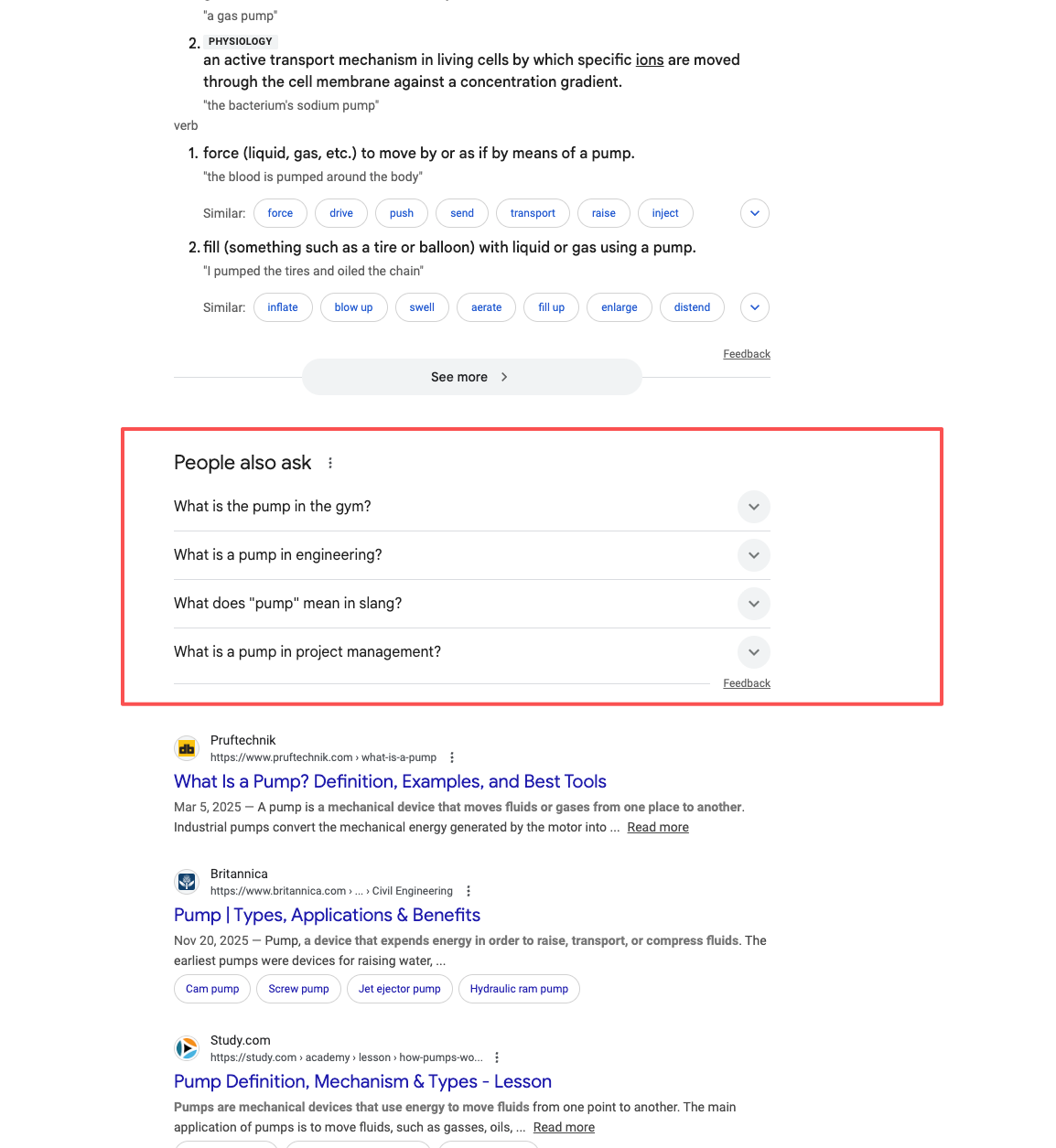
Why is PAA particularly valuable for new websites?
The biggest challenge for new websites is the lack of domain authority. The traditional SEO approach is: first build backlinks and increase authority, then you can rank. But PAA breaks this rule.
根据 Semrush 的研究,74% 出现在 PAA 框中的网站并不在 Google 第一页。这意味着 Google 选择 PAA 答案时,使用的标准与常规排名不同。它更看重内容是否直接回答了问题,而不是你的网站有多少反向链接。
This leads to a key concept: Topical Authority.
Topical Authority refers to your website's expertise in a specific field. When you create multiple related FAQ pages around a topic, you are signaling to Google: we are experts in this area.
For new websites with limited budgets, PAA is the most underestimated SEO opportunity. You don't need tools or a high-authority domain; you only need to systematically answer user questions.
5-Minute PAA Workflow
The following are the complete steps, taking only 5 minutes from start to finish.
Step 1: Search your topic on Google (30 seconds)
Open Google and enter the topic for which you want to establish authority. For example, "coffee brewing methods" or "small business accounting."
After the search results appear, scroll down. You will see a box labeled "People also ask." This box usually appears after the first search result and contains 4-6 questions.
If you don't see the PAA box, try a broader or more specific search term. PAA appears in approximately half to three-quarters of searches.
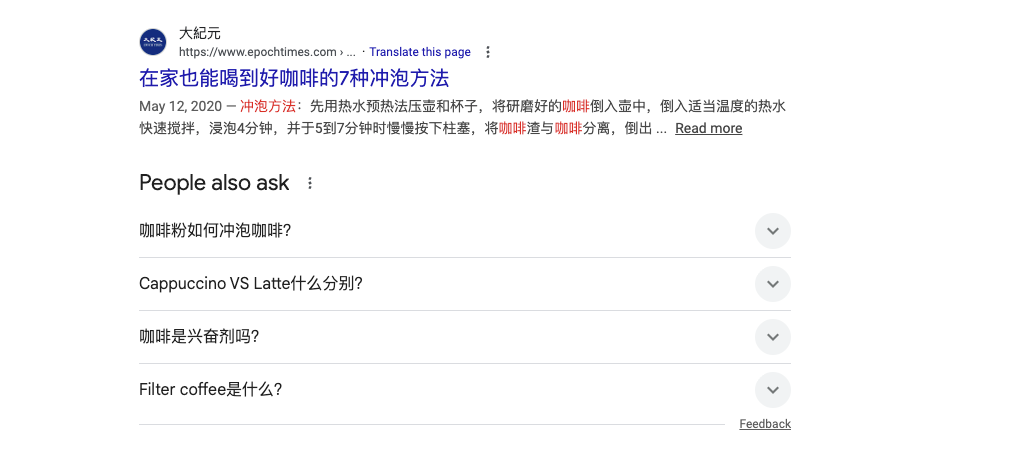
Step 2: Click and screenshot PAA questions (2 minutes)
This step utilizes the cascading effect of PAA to discover more questions.
How to do it:
- 1. Click the first question; it will expand to show the answer.
- 2. Observe: 2-3 new questions will appear at the bottom.
- 3. Continue clicking the newly appeared questions.
- 4. Each click will generate more related questions.
- 5. Use a screenshot tool to save all the questions you discover.
A single search can typically uncover a dozen or more related questions. These are real questions users are asking—Google's machine learning algorithms analyze billions of searches to generate these questions.
Step 3: Use free AI tools to write answers (2 minutes)
Now you have a list of questions and need to quickly write answers.
Open Perplexity (perplexity.ai) or ChatGPT, and input a prompt like this:
"Please write a concise answer for the following question, approximately 100-120 words, directly addressing the question without being verbose: [paste question]"
Research shows that the best answers in PAA average about 41 English words in length. It can be slightly longer, but keeping it concise is key.
Important reminder: AI-generated content must be manually reviewed. Check factual accuracy, add your own insights and examples, and adjust the language style. Pure AI content performs poorly after Google's core algorithm update in 2025.
Step 4: Create individual FAQ pages (30 seconds setup)
This is a crucial step: create a separate page for each question, rather than placing all Q&As on a single FAQ page.
Page setup rules:
- • Title: Use the question itself directly (e.g., "How long do coffee beans last before expiring?")
- • URL (slug): A simplified version of the question, separated by hyphens.
- • Content: The first paragraph directly answers the question; subsequent paragraphs provide detailed explanations.
独立页面比折叠式 FAQ 更有利于 SEO。原因很简单:页面标题等于问题,URL 包含关键词,整个页面都在回答这一个问题——这给了 Google 100% 明确的信号。
Why are individual pages better than accordion-style FAQs?
Many websites prefer accordion-style FAQs: placing all questions on one page, with answers expanding only upon clicking. This design offers good user experience but is not optimal for SEO.
Advantages of individual FAQ pages:
- • Each page can be optimized for a specific keyword in the title and meta description.
- • The page title is the exact question users are searching for.
- • The entire page content revolves around one question, resulting in extremely high relevance.
- • Each page can independently participate in PAA rankings.
When are accordion-style FAQs suitable?
- • When answers are very short (only 1-2 sentences) (e.g., "How much is the Dingqiao Mate 40 phone?")
- • When questions have extremely low or almost no search volume.
- • When questions are highly related, and users need to see multiple answers simultaneously.
My suggestion: For questions with search volume, always choose individual pages. Search this question on Google; if the PAA box appears, it means people are searching for it—create an individual page.
Schema Markup: Is it still needed in 2025?
Many SEO tutorials will tell you: adding FAQ Schema markup can earn Google's rich snippet display (showing the Q&A dropdown in search results). This was true before August 2023.
However, Google changed its policy in August 2023. Now, only authoritative health websites and government websites can receive FAQ rich snippets. Ordinary websites will not see any visual changes in search results after adding Schema markup.
For most small websites, Schema is optional. Focus your efforts on content quality and structure, not technical markup.
But Schema is not entirely useless. Voice search devices (like Google Home) and AI assistants (like ChatGPT's search function) still use Schema to understand your content. If your target audience uses voice search, or if you want AI to correctly reference your content, adding Schema still holds value.
Frequently Asked Questions
Is PAA traffic truly valuable?
PAA 框的点击率约为搜索结果整体点击的 3-6%。这个数字看起来不高,但要考虑两点:
First, PAA appears in a vast number of searches. Even with a low click-through rate, the enormous impression base translates into significant traffic.
Second, PAA traffic is of high quality. Users explicitly click on a question, indicating a genuine desire to know the answer. This represents a clearer intent than random search clicks.
Do I need to purchase any tools?
No.
The methods introduced in this article are completely free:
- • Google Search: Free, unlimited
- • Cascading question discovery: Free, unlimited
- • AI writing tools: Both Perplexity and ChatGPT offer free versions
If you wish to improve efficiency, AlsoAsked.com provides 3 free searches per day, automatically scraping PAA questions and displaying them in a tree diagram. However, this is for efficiency enhancement, not a necessity.
Manual methods are still strongly recommended.
The advantage of the manual approach is that during the process of discovering questions, you read competitors' answers, which helps you write better content.
Next Steps
Start now: Choose a core topic on which you want to build topical authority.
Execute the 5-minute workflow learned today: Search, click, screenshot, AI writing, create page.
A single topic can typically yield multiple FAQ pages. Once published, these pages form a topic cluster, demonstrating your expertise in this field to Google.
First-month goal: Create 10 FAQ pages around your core topic. This is the starting point for building topical authority using free methods.